Freitag, 9. Mai 2014

Connect RaspPI to WiFi

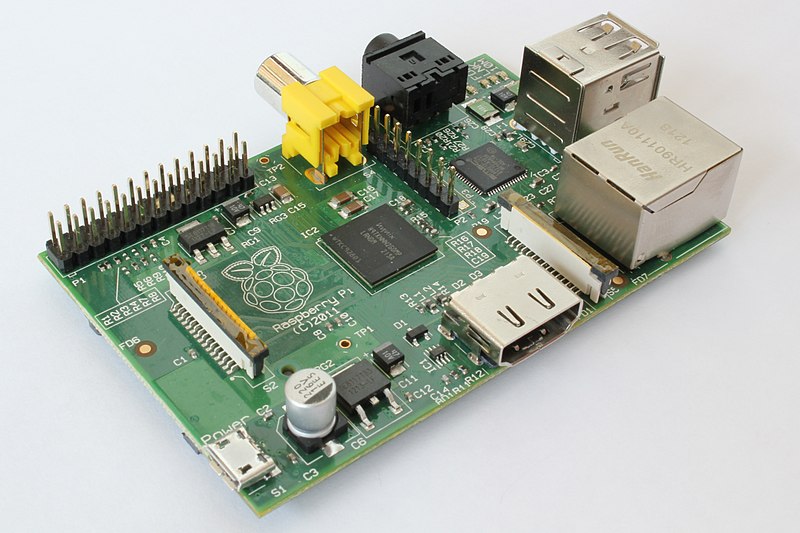
Recently I've ordered two WiFi dongles for my Raspberry PI home project and today I received a parcel.

Prices:
2 x Wireless Adapter Network LAN Card 802.11n/g/b 2.4GHz - $3.41 / piece

Honestly said I had to investigate this topic before purchase, but in fact when I connected it to PI and set up wireless connection I was upset - it seemed not working.

Donnerstag, 1. Mai 2014

Ultrasonic Sensor: first try

After few weeks waiting they finally came to me direct from China: my new Arduino Nano and a couple of ultrasonic sensors.

Price:

  • 1 x Ultrasonic Module HC-SR04 Distance Measuring Transducer Sensor - $2.56 / piece
  • 1 x Funduino Nano 3.0 controller - $7.89 / piece.
As soon as I have time I decided so do simple experiment.

First of all I connected VCC and GND pins to common rails and then to corresponding pins of ultrasonic sensor. After that I connected Trigger to Pin 3 and Echo to Pin 2 of Arduino board. As in many existing examples I decided to output signal through Piezo Buzzer. I simply connected Pin 4 of Arduino to positive leg of buzzer and the other leg to common ground.

Montag, 3. März 2014

API documentation for SBT project

Laika can help you easily add documentation to your SBT project. Whole process is described here and following list contains necessary steps:
  1. Add a line to your project/plugins.sbt file
    addSbtPlugin("org.planet42" % "laika-sbt" % "0.5.0")
  2. These lines to build.sbt
    import laika.sbt.LaikaSbtPlugin.{LaikaPlugin, LaikaKeys}
    import LaikaKeys._
    LaikaPlugin.defaults
  3. If you want to redefine default settings
    sourceDirectories in Laika := Seq(new java.io.File("app/docs"))
    includeAPI in Laika := true
  4. Build documentation by executing following command from SBT console
    laika:site  

Change Jenkins default port on Mac

If you want to run Jenkins locally on Mac OS X and change default port 8080 you have to change httpPost parameter using following command:
sudo defaults write /Library/Preferences/org.jenkins-ci.plist httpPort 9000
 After that you have to restart Jenkins:
sudo launchctl unload /Library/LaunchDaemons/org.jenkins-ci.plist
sudo launchctl load /Library/LaunchDaemons/org.jenkins-ci.plist
Thats it.

Sonntag, 5. Januar 2014

CloudControl - setup Scala/Play application

CloudControl (https://www.cloudcontrol.com) is a Platform as a Service solution.

You can deploy on it Java  NodeJS  PHP  Python  Ruby applications as well as a lot of Third-Party Buildpacks including Scala/Play (https://github.com/heroku/heroku-buildpack-play). Its main particularity is that it supports vertical and horizontal scaling.

The following guide explains how to deploy your application on CloudControl.

Sonntag, 15. Dezember 2013

Life after Coderetreat 2013

Last Saturday I was on Coderetreat 2013 in Vienna. There we tried to implement rules of Conway's Game of Life. During the day I've got a lot of experience in TDD, pair programming and languages I haven't used for a while. One thing I've missed was final implementation of game.

One day after the event I've tried some ideas I'd got before. I've pushed my own implementation of game in my Github repository and created an instance of server on Heroku.

Montag, 9. Dezember 2013

RPI: extending swap

Last weekend I spent some time running my Scala/Play application on Raspberry PI. I got an OutOfMemoryError and had to slightly extend swap space:

 >sudo su  
 >echo "CONF_SWAPSIZE=512" > /etc/dphys-swapfile  
 >dphys-swapfile setup  
 >dphys-swapfile swapon  

Sonntag, 24. November 2013

Quotes from Coffeescript Application Development book

Above I posted some extractions from the book Coffeescript Application Development I found the most interesting.

Classes
Most of the time, you will define your methods in the main body of the class definition. This is the easiest and most logical place. However, there are a few occasions when you may wish to attach a method to an object prototype from somewhere else in the code. This may be for stylistic or metaprogramming reasons, or most likely, to attach methods to an object that you did not define. CoffeeScript provides the :: operator for easy access to an object's prototype.
 Variable arguments list
Appending ... to an argument name in the function definition tells CoffeeScript to accept any number of arguments. That variable will be assigned an array containing all the relevant values that were passed.
Check on existence
CoffeeScript has a helpful existential operator to deal with these situations correctly and cleanly. It is a simple ? symbol.
Destructuring assignments
We can even use destructuring assignment to perform in-place variable swaps:
[first, second] = ["cow", "milk"]
# Wait, or is it the other way around?
[first, second] = [second, first]
console.log "Don't put the #{second} before the #{first}."
Destructuring assignment can be used with more complicated structures too:
[drink, [alcohol, mixer]] = ["Screwdriver", ["vodka", "orange juice"]]
console.log "A #{drink} consists of #{alcohol} and #{mixer}."
Loops return array of results
One extremely useful feature of CoffeeScript loops is that they return a value—an array of the results of the inner statement for every item in the loop. If you've ever used Array.prototype.map to transform an array, you'll be happy to see that it's easy to achieve the same functionality in CoffeeScript.
Link on book in store

Review of CoffeScript Application Development book


CoffeeScript Application Development, the book I read lately, helped me to take overall look at the language I have recently used on a number of projects. Like many books about programming languages it is also divided into chapters which follow you from the very beginning — tools installation and basic syntax to more advanced topics like classes and asynchronous operations. The book also covers such things as debugging, using the language for server-side development and adopting it for usage with different JS-frameworks.

Each topic of a book goes with a number of examples clearly showing how to use specific CoffeeScript features and what code will look like after compilation into JavaScript. The only thing I found ineffective is a way how author presented the example application. Its progress was mixed within the material treatment. For me as a person who read a book without immediate trying and following examples by hand it has been difficult to get a sense of this examples. I would rather move this example application into separate appendix and make cross-links on related topics. Thus the material treatment could be more consistent and at the same time the example application could be more readable and perceptive.

I would definitely recommend this book for reading people who find annoying such things in JS as checking curly braces parenthesis, frequently testing variables on existence and maintaining code written using different code conventions.

After reading I have got obvious feeling that CoffeeScript makes code much clearer and understandable allowing to explain things in a very concise way in comparison with bare JavaScript and as the result it makes code better maintainable. As soon as ease of maintainability is one of the corner stones of software development in modern realities the profit from usage CoffeeScript excessively covers spending time on its learning and getting on usage.

You can find this book on the following link


Freitag, 13. September 2013

Yet another stack plugin for Flotchart

For my own project I need a plugin which can display at the same time stacked bars with the positive and negative values and usual line stacked charts with positive values.

There are two plugins which can do it:

  1. Stack plugin from Flot distribution
  2. Stack Positive Negative Bars by ericliao
Each of these plugins does a part of job. The first one can display line and bar charts only with positive values. The socone does not work with line charts.

That was the reason why I decided to write yet another plugin for Flot.

You may see here the results and sources on Github.


Feel free to use and contribute.

P.S.: I have an ide to update it to show stacked line diagrams with negative values also, but not sure that user can interpret it correctly :)